Publishing services - service types
For some parts of your application (e.g. frontends) you may want to expose a Service onto an external (outside of your cluster) IP address.
Kubernetes ServiceTypes allow you to specify what kind of service you want. The default is ClusterIP.
Type values and their behaviors are:
- ClusterIP: Exposes the service on a cluster-internal IP. Choosing this value makes the service only reachable from within the cluster. This is the default
ServiceType. - NodePort: Exposes the service on each Node’s IP at a static port (the
NodePort). AClusterIPservice, to which theNodePortservice will route, is automatically created. You’ll be able to contact theNodePortservice, from outside the cluster, by requesting<NodeIP>:<NodePort>. - LoadBalancer: Exposes the service externally using a cloud provider’s load balancer.
NodePortandClusterIPservices, to which the external load balancer will route, are automatically created. - ExternalName: Maps the service to the contents of the
externalNamefield (e.g.foo.bar.example.com), by returning aCNAMErecord with its value. No proxying of any kind is set up. This requires version 1.7 or higher ofkube-dns.
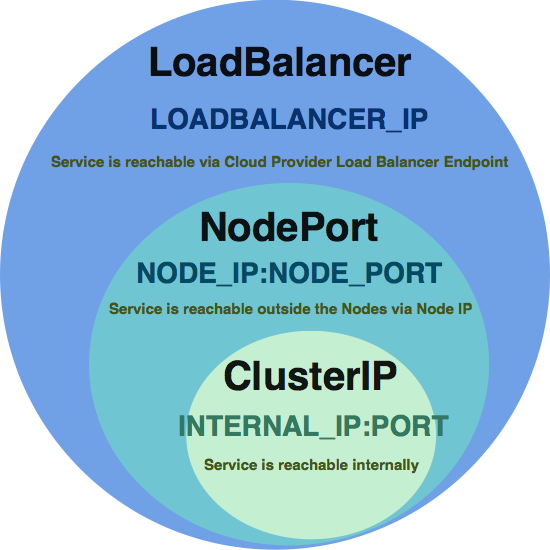
LoadBalancer includes the features of NodePort and ClusterIP.
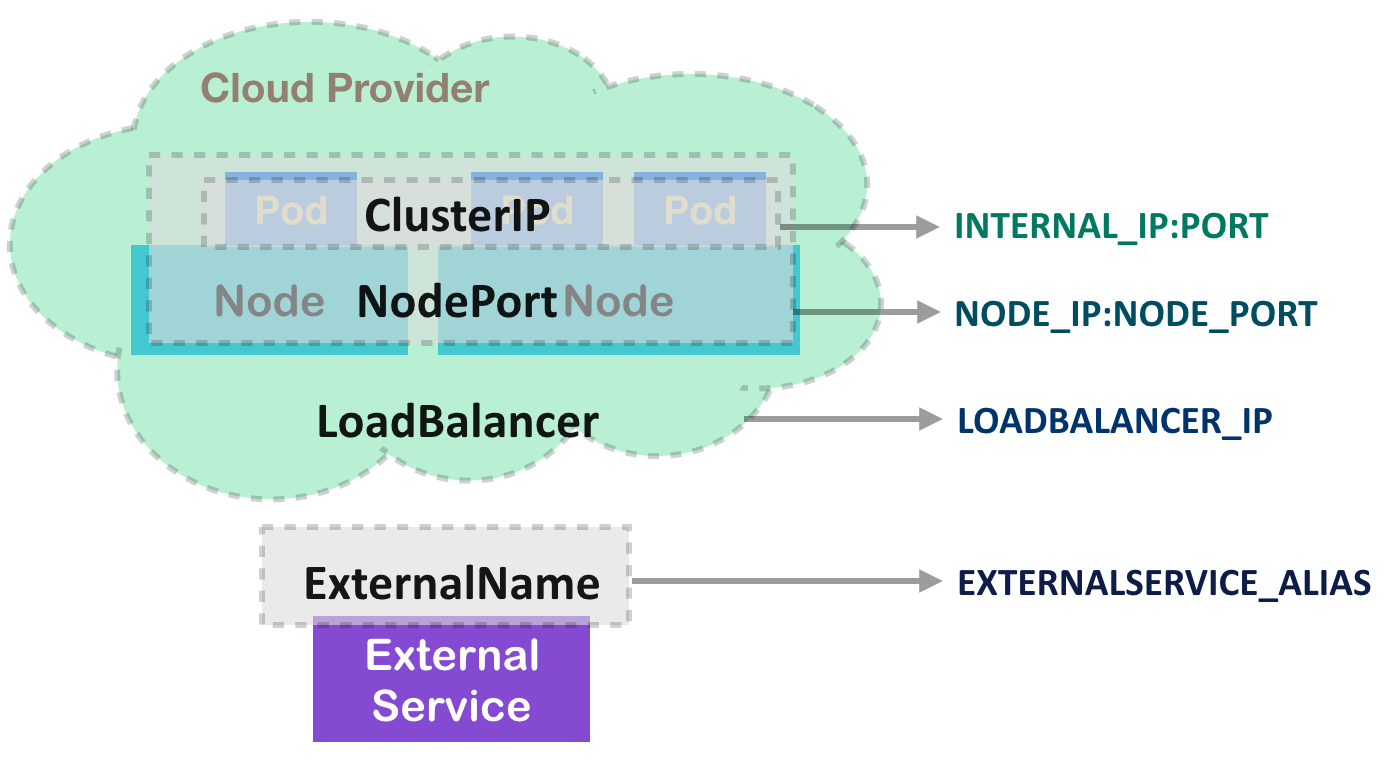
ClusterIP
ClusterIP is the default service type. It exposes the service on a cluster-internal IP. Pods in the cluster could reach the service via the IP address, environment variables, or DNS.
kubectl run kubernetes-bootcamp --image=gcr.io/google-samples/kubernetes-bootcamp:v1 --port=8080 --replicas=4
deployment.apps "kubernetes-bootcamp" created

kubectl get deployments
NAME                  DESIRED   CURRENT   UP-TO-DATE   AVAILABLE   AGE
kubernetes-bootcamp   4         4         4            4           2m
Expose app
kubectl get endpoints
NAME         ENDPOINTS           AGE
kubernetes   139.59.81.67:6443   1m

kubectl expose deployment/kubernetes-bootcamp --type="ClusterIP" --port 8080
service "kubernetes-bootcamp" exposed

kubectl get endpoints
NAME                  ENDPOINTS                                                               AGE
kubernetes            139.59.81.67:6443                                                       1m
kubernetes-bootcamp   10.244.128.75:8080,10.244.190.140:8080,10.244.230.10:8080 + 1 more...   6s
Get the exposed port
kubectl describe services/kubernetes-bootcamp
...
Type:              ClusterIP
IP:                10.101.192.50
Port:              <unset>  8080/TCP
TargetPort:        8080/TCP
Endpoints:         10.244.128.75:8080,10.244.190.140:8080,10.244.230.10:8080 + 1 more...
...
curl icanhazip.com
139.59.81.67

curl 139.59.81.67:8080
curl: (7) Failed to connect to 139.59.81.67 port 8080: Connection refused

curl 10.244.128.75:8080
Hello Kubernetes bootcamp! | Running on: kubernetes-bootcamp-5c69669756-csl49 | v=1

curl 10.244.190.140:8080
Hello Kubernetes bootcamp! | Running on: kubernetes-bootcamp-5c69669756-dxphd | v=1

curl 10.244.230.10:8080
Hello Kubernetes bootcamp! | Running on: kubernetes-bootcamp-5c69669756-kgw6j | v=1
By default, Kubernetes will expose seven environment variables for each service. In most cases, the first two will be used for using kube-dns addon to do service discovery for us
- ${SVCNAME}_SERVICE_HOST
- ${SVCNAME}_SERVICE_PORT
- ${SVCNAME}_PORT
- ${SVCNAME}PORT${PORT}_${PROTOCAL}
- ${SVCNAME}PORT${PORT}_${PROTOCAL}_PROTO
- ${SVCNAME}PORT${PORT}_${PROTOCAL}_PORT
- ${SVCNAME}PORT${PORT}_${PROTOCAL}_ADDR
NodePort
If the service is set as NodePort, Kubernetes will allocate a port within a certain range on each node. Any traffic going to nodes on that port will be routed to the service port. Port number could be user-specified. If not specified, Kubernetes will randomly choose a port from range 30000 to 32767 without collision. On the other hand, if specified, the user should be responsible to manage the collision by themselves. NodePort includes the feature of ClusterIP. Kubernetes assigns an internal IP to the service.
kubectl run kubernetes-bootcamp --image=gcr.io/google-samples/kubernetes-bootcamp:v1 --port=8080 --replicas=4
deployment.apps "kubernetes-bootcamp" created

kubectl get deployments
NAME                  DESIRED   CURRENT   UP-TO-DATE   AVAILABLE   AGE
kubernetes-bootcamp   4         4         4            4           2m
Expose app
kubectl get endpoints
NAME             ENDPOINTS                                            AGE

kubectl expose deployment/kubernetes-bootcamp --type="NodePort" --port 8080
service "kubernetes-bootcamp" exposed

kubectl get endpoints
NAME                  ENDPOINTS                                                  AGE
kubernetes-bootcamp   10.44.0.8:8080,10.44.1.9:8080,10.44.2.8:8080 + 1 more...   1m
Get the exposed port
kubectl describe services/kubernetes-bootcamp
...
Type:                     NodePort
IP:                       10.47.255.46
Port:                     <unset>  8080/TCP
TargetPort:               8080/TCP
NodePort:                 <unset>  31272/TCP
Endpoints:                10.244.128.77:8080,10.244.190.142:8080,10.244.230.12:8080 + 1 more...
...
curl icanhazip.com
139.59.81.67

curl 139.59.81.67:31272
Hello Kubernetes bootcamp! | Running on: kubernetes-bootcamp-5c69669756-p6rcr | v=1

curl 10.244.128.77:8080
Hello Kubernetes bootcamp! | Running on: kubernetes-bootcamp-5c69669756-4fgc2 | v=1

curl 10.244.190.142:8080
Hello Kubernetes bootcamp! | Running on: kubernetes-bootcamp-5c69669756-qxmvw | v=1

curl 10.244.230.12:8080
Hello Kubernetes bootcamp! | Running on: kubernetes-bootcamp-5c69669756-kdvkb | v=1
LoadBalancer
This type is only usable with cloud provider support, such as Google Cloud Platform and Amazon Web Service. By creating LoadBalancer service, Kubernetes will provision a load balancer by the Cloud provider to the service.
ExternalName
Sometimes we leverage different services in the cloud. Kubernetes is flexible enough to be hybrid. ExternalName is one of the bridges to create a CNAME for external endpoints into the cluster.
Service without selectors
Service uses selectors to match the pods to direct the traffic. However, sometimes you need to implement a proxy to be the bridge between Kubernetes cluster and another namespace, another cluster, or external resources.
Create a service without selectors
cat << EOF > 3-2-3_service_wo_selector_srv.yaml
kind: Service
apiVersion: v1
metadata:
  name: google-proxy
spec:
  ports:
    - protocol: TCP
      port: 80
      targetPort: 80
EOF

kubectl create -f 3-2-3_service_wo_selector_srv.yaml
service "google-proxy" created
No Kubernetes endpoint will be created since there is no selector. Kubernetes doesn't know where to route the traffic since no selector could match the pods. We'll have to create that on our own.
In the Endpoints object, the source addresses can't be DNS name, so we'll use nslookup to find the current Google IP from the domain, and add them into Endpoints.subsets.addresses.ip
nslookup www.google.com
Server:         67.207.67.3
Address:        67.207.67.3#53

Non-authoritative answer:
Name:   www.google.com
Address: 172.217.166.132
# create endpoints for the ip from google.com
cat << EOF > 3-2-3_service_wo_selector_endpoints.yaml
kind: Endpoints
apiVersion: v1
metadata:
  name: google-proxy
subsets:
  - addresses:
      - ip: 172.217.166.132
    ports:
      - port: 80
EOF

kubectl create -f 3-2-3_service_wo_selector_endpoints.yaml
endpoints "google-proxy" created
Let's create another pod in the cluster to access our Google proxy
export GOOGLE_PROXY_SERVICE_HOST=172.217.166.132
cat << EOF > 3-2-3_proxy-chk.yaml
apiVersion: v1
kind: Pod
metadata:
  name: proxy-chk
spec:
  containers:
  - name: centos
    image: centos
    command: ["/bin/sh", "-c", "while : ;do curl -L http://${GOOGLE_PROXY_SERVICE_HOST}:80/; sleep 10; done"]
EOF

kubectl create -f 3-2-3_proxy-chk.yaml
pod "proxy-chk" created
Let's check the stdout from the pod
kubectl logs proxy-chk
% Total % Received % Xferd Average Speed Time Time Time Current
Dload Upload Total Spent Left Speed
100 219 100 219 0 0 1937 0 --:--:-- --:--:-- --:--:-- 1955
<!doctype html><html itemscope="" itemtype="http://schema.org/WebPage" lang="en-IN"><head><meta content="text/html; charset=UTF-8" http-equiv="Content-Type"><meta content="/logos/doodles/2018
/world-cup-2018-day-1-5741876039647232-l.png" itemprop="image"><meta content="World Cup 2018 - Day 1" property="twitter:title"><meta content="Let the matches begin! Celebrate ⚽ around t
he 🌎🌍🌏 in today's #GoogleDoodle!" property="twitter:description"><meta content="Let the matches begin! Celebrate ⚽ around the 🌎🌍🌏 in toda
y's #GoogleDoodle!" property="og:description"><meta content="summary_large_image" property="twitter:card"><meta content="@GoogleDoodles" property="twitter:site"><meta content="https://www.goo
gle.com/logos/doodles/2018/world-cup-2018-day-1-5741876039647232-2x.png" property="twitter:image"><meta content="https://www.google.com/logos/doodles/2018/world-cup-2018-day-1-574187603964723
2-2x.png" property="og:image"><meta content="1150" property="og:image:width"><meta content="460" property="og:image:height"><title>Google</title><script nonce="hm4yHsDVv023E+mSwE8/2Q==">(func
tion(){window.google={kEI:'SwgiW7OQFYv4vgSO35_oDA',kEXPI:'0,201836,1151911,57,1957,930,88,39,241,160,336,214,852,48,30,75,566,60,9,89,43,154,321,62,190,2339794,240,187,32,21,329273,1294,12383
,2347,2508,32692,15247,864,772,7,792,7,5117,5471,6381,3335,2,2,2138,2471,2192,367,550,664,2102,113,2201,3191,224,502,5,1711,58,71,131,4628,479,575,1119,2,579,663,64,311,3,298,1820,58,2,2,2,54
2,755,284,1059,369,27,1349,505,730,377,26,1214,479,609,55,630,9,299,237,1032,280,494,194,1038,1021,278,2,694,148,282,1666,35,428,330,28,850,393,132,22,180,419,5,2,2,151,506,443,218,2,78,345,1
67,389,125,2,65,3,613,161,161,5,391,29,272,31,361,505,1151,685,260,214,82,236,60,6,145,195,79,623,205,163,500,11,40,35,57,80,28,334,123,7,483,373,383,105,394,902,182,7,3,25,506,19,381,4,4,108
,83,714,187,4,4,4,4,79,267,2330676,3685998,2545,9,5997613,2800173,4,1572,549,332,445,1,2,1,1,77,1,1,900,207,1,1,1,1,1,366,9,309,1,8,1,2,1,1,924,181,1,19,2,4,18,17,2,17,232,21,11,11,1,1,223104
74',authuser:0,kscs:'c9c918f0_SwgiW7OQFYv4vgSO35_oDA',kGL:'IN'};google.kHL='en-IN';})();google.time=function(){return(new Date).getTime()};(function(){google.lc=[];google.li=0;google.getEI=fu
nction(a){for(var b;a&&(!a.getAttribute||!(b=a.getAttribute("eid")));)a=a.parentNode;return b||google.kEI};google.getLEI=function(a){for(var b=null;a&&(!a.getAttribute||!(b=a.getAttribute("le
id")));)a=a.parentNode;return b};google.https=function(){return"https:"==window.location.protocol};google.ml=function(){return null};google.wl=function(a,b){try{google.ml(Error(a),!1,b)}catch
(d){}};google.log=function(a,b,d,c,g){if(a=google.logUrl(a,b,d,c,g)){b=new Image;var e=google.lc,f=google.li;e[f]=b;b.onerror=b.onload=b.onabort=function(){delete e[f]};google.vel&&google.vel
.lu&&google.vel.lu(a);b.src=a;google.li=f+1}};google.logUrl=function(a,b,d,c,g){var e="",f=google.ls||"";d||-1!=b.search("&ei=")||(e="&ei="+google.getEI(c),-1==b.search("&lei=")&&(c=google.ge
tLEI(c))&&(e+="&lei="+c));c="";!d&&google.cshid&&-1==b.search("&cshid=")&&(c="&cshid="+google.cshid);a=d||"/"+(g||"gen_204")+"?atyp=i&ct="+a+"&cad="+b+e+f+"&zx="+google.time()+c;/^http:/i.tes
t(a)&&google.https()&&(google.ml(Error("a"),!1,{src:a,glmm:1}),a="");return a};}).call(this);(function(){google.y={};google.x=function(a,b){if(a)var c=a.id;else{do c=Math.random();while(googl
e.y[c])}google.y[c]=[a,b];return!1};google.lm=[];google.plm=function(a){google.lm.push.apply(google.lm,a)};google.lq=[];google.load=function(a,b,c){google.lq.push([[a],b,c])};google.loadAll=f
unction(a,b){google.lq.push([a,b])};}).call(this);google.f={};var a=window.location,b=a.href.indexOf("#");if(0<=b){var c=a.href.substring(b+1);/(^|&)q=/.test(c)&&-1==c.indexOf("#")&&a.replace
("/search?"+c.replace(/(^|&)fp=[^&]*/g,"")+"&cad=h")};</script><style>#gbar,#guser{font-size:13px;padding-top:1px !important;}#gbar{height:22px}#guser{padding-bottom:7px !important;text-align
:right}.gbh,.gbd{border-top:1px solid #c9d7f1;font-size:1px}.gbh{height:0;position:absolute;top:24px;width:100%}@media all{.gb1{height:22px;margin-right:.5em;vertical-align:top}#gbar{float:le
ft}}a.gb1,a.gb4{text-decoration:underline !important}a.gb1,a.gb4{color:#00c !important}.gbi .gb4{color:#dd8e27 !important}.gbf .gb4{color:#900 !important}
</style><style>body,td,a,p,.h{font-family:arial,sans-serif}body{margin:0;overflow-y:scroll}#gog{padding:3px 8px 0}td{line-height:.8em}.gac_m td{line-height:17px}form{margin-bottom:20px}.h{col
or:#36c}.q{color:#00c}.ts td{padding:0}.ts{border-collapse:collapse}em{font-weight:bold;font-style:normal}.lst{height:25px;width:496px}.gsfi,.lst{font:18px arial,sans-serif}.gsfs{font:17px ar
ial,sans-serif}.ds{display:inline-box;display:inline-block;margin:3px 0 4px;margin-left:4px}input{font-family:inherit}a.gb1,a.gb2,a.gb3,a.gb4{color:#11c !important}body{background:#fff;color:
black}a{color:#11c;text-decoration:none}a:hover,a:active{text-decoration:underline}.fl a{color:#36c}a:visited{color:#551a8b}a.gb1,a.gb4{text-decoration:underline}a.gb3:hover{text-decoration:n
one}#ghead a.gb2:hover{color:#fff !important}.sblc{padding-top:5px}.sblc a{display:block;margin:2px 0;margin-left:13px;font-size:11px}.lsbb{background:#eee;border:solid 1px;border-color:#ccc
#999 #999 #ccc;height:30px}.lsbb{display:block}.ftl,#fll a{display:inline-block;margin:0 12px}.lsb{background:url(/images/nav_logo229.png) 0 -261px repeat-x;border:none;color:#000;cursor:poin
ter;height:30px;margin:0;outline:0;font:15px arial,sans-serif;vertical-align:top}.lsb:active{background:#ccc}.lst:focus{outline:none}</style><script nonce="hm4yHsDVv023E+mSwE8/2Q=="></script>
<link href="/images/branding/product/ico/googleg_lodp.ico" rel="shortcut icon"></head><body bgcolor="#fff"><script nonce="hm4yHsDVv023E+mSwE8/2Q==">(function(){var src='/images/nav_logo229.pn
g';var iesg=false;document.body.onload = function(){window.n && window.n();if (document.images){new Image().src=src;}
if (!iesg){document.f&&document.f.q.focus();document.gbqf&&document.gbqf.q.focus();}
}
0 0 0 14069 0 0 44889 0 --:--:-- --:--:-- --:--:-- 44889
We can now confirm the proxy works. The traffic to the service will be routed to the endpoints we specified.