Blocking rollouts of bad versions
You used minReadySeconds to slow down a rollout, so you could see it was indeed performing a rolling update and not replacing all the pods at once. The main function of minReadySeconds is to prevent deploying malfunctioning versions, not slowing down a deployment for fun.
The minReadySeconds property specifies how long a newly created pod should be ready before the pod is treated as available. Until the pod is available, the rollout process will not continue (the maxUnavailable property). A pod is ready when readiness probes of all its containers return a success. If a new pod isn’t functioning properly and its readiness probe starts failing before minReadySeconds have passed, the rollout of the new version will effectively be blocked.
You used this property to slow down your rollout process by having Kubernetes wait 10 seconds after a pod was ready before continuing with the rollout. Usually, you’d set minReadySeconds to something much higher to make sure pods keep reporting they’re ready after they’ve already started receiving actual traffic.
Although you should obviously test your pods both in a test and in a staging environment before deploying them into production, using minReadySeconds is like an airbag that saves your app from making a big mess after you’ve already let a buggy version slip into production.
With a properly configured readiness probe and a proper minReadySeconds setting, Kubernetes would have prevented us from deploying the buggy v3 version earlier.
Defining a readiness probe to prevent our v3 version from being rolled out fully
Unlike before, where you only updated the image in the pod template, you’re now also going to introduce a readiness probe for the container at the same time. Up until now, because there was no explicit readiness probe defined, the container and the pod were always considered ready, even if the app wasn’t truly ready or was returning errors. There was no way for Kubernetes to know that the app was malfunctioning and shouldn’t be exposed to clients.
To change the image and introduce the readiness probe at once, you’ll use the kubectl apply command.
cat << EOF > kubia-deployment-v3-with-readinesscheck.yaml
apiVersion: apps/v1beta1
kind: Deployment
metadata:
  name: kubia
spec:
  replicas: 3
  minReadySeconds: 10
  strategy:
    rollingUpdate:
      maxSurge: 1
      maxUnavailable: 0
    type: RollingUpdate
  template:
    metadata:
      name: kubia
      labels:
        app: kubia
    spec:
      containers:
      - image: luksa/kubia:v3
        name: nodejs
        readinessProbe:
          periodSeconds: 1
          httpGet:
            path: /
            port: 8080
EOF
minReadySecondsset to 10.maxUnavailableset to 0 to make the deployment replace pods one by one- You’re defining a readiness probe that will be executed every second.
- The readiness probe will perform an
HTTP GETrequest against our container.
To update the Deployment this time, you’ll use kubectl apply like this:
kubectl apply -f kubia-deployment-v3-with-readinesscheck.yaml
Warning: kubectl apply should be used on resource created by either kubectl create --save-config or kubectl apply
deployment.apps "kubia" configured
The apply command updates the Deployment with everything that’s defined in the YAML file. It not only updates the image but also adds the readiness probe definition and anything else you’ve added or modified in the YAML.
To keep the desired replica count unchanged when updating a Deployment with
kubectl apply, don’t include thereplicasfield in the YAML.
kubectl rollout status deployment kubia
Waiting for rollout to finish: 1 out of 3 new replicas have been updated...
Waiting for rollout to finish: 1 out of 3 new replicas have been updated...
Because the status says one new pod has been created, your service should be hitting it occasionally, right? Let’s see:
while true; do curl 35.232.43.157:32229; done
This is v4 running in pod kubia-6bb8b7b85c-gg7vs
This is v4 running in pod kubia-6bb8b7b85c-gg7vs
This is v4 running in pod kubia-6bb8b7b85c-sg7dd
This is v4 running in pod kubia-6bb8b7b85c-gg7vs
This is v4 running in pod kubia-6bb8b7b85c-zhh9t
^C
Nope, you never hit the v3 pod.
kubectl get po
NAME                     READY     STATUS    RESTARTS   AGE
kubia-6bb8b7b85c-gg7vs   1/1       Running   0          17m
kubia-6bb8b7b85c-sg7dd   1/1       Running   0          17m
kubia-6bb8b7b85c-zhh9t   1/1       Running   0          20m
kubia-6cfbc9c96b-c2pn7   0/1       Running   0          3m
Understanding how a readiness probe prevents bad versions from being rolled out
As soon as your new pod starts, the readiness probe starts being hit every second (you set the probe’s interval to one second in the pod spec). On the fifth request the readiness probe began failing, because your app starts returning HTTP status code 500 from the fifth request onward.
As a result, the pod is removed as an endpoint from the service. By the time you start hitting the service in the curl loop, the pod has already been marked as not ready. This explains why you never hit the new pod with curl. And that’s exactly what you want, because you don’t want clients to hit a pod that’s not functioning properly.
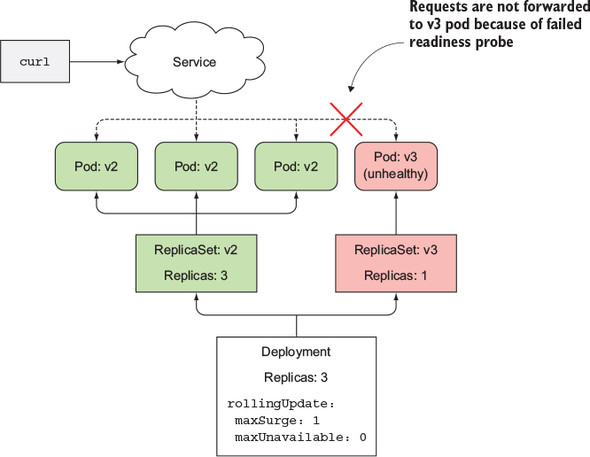
The rollout status command shows only one new replica has started. Thankfully, the rollout process will not continue, because the new pod will never become available. To be considered available, it needs to be ready for at least 10 seconds. Until it’s available, the rollout process will not create any new pods, and it also won’t remove any original pods because you’ve set the maxUnavailable property to 0.
The fact that the deployment is stuck is a good thing, because if it had continued replacing the old pods with the new ones, you’d end up with a completely non-working service, like you did when you first rolled out version 3, when you weren’t using the readiness probe. But now, with the readiness probe in place, there was virtually no negative impact on your users. A few users may have experienced the internal server error, but that’s not as big of a problem as if the rollout had replaced all pods with the faulty version 3.
If you only define the readiness probe without setting
minReadySecondsproperly, new pods are considered available immediately when the first invocation of the readiness probe succeeds. If the readiness probe starts failing shortly after, the bad version is rolled out across all pods. Therefore, you should setminReadySecondsappropriately.
By default, after the rollout can’t make any progress in 10 minutes, it’s considered as failed. If you use the kubectl describe deployment command, you’ll see it display a ProgressDeadlineExceeded condition
kubectl describe deployment kubia
...
Conditions:
  Type           Status  Reason
  ----           ------  ------
  Available      True    MinimumReplicasAvailable
  Progressing    False   ProgressDeadlineExceeded
...
The time after which the Deployment is considered failed is configurable through the progressDeadlineSeconds property in the Deployment spec.
Aborting a bad rollout
Because the rollout will never continue, the only thing to do now is abort the rollout by undoing it:
kubectl rollout undo deployment kubia
deployment.apps "kubia"