kube-proxy
kube-proxy is a network proxy that runs on each node in your cluster, implementing part of the Kubernetes Service concept. kube-proxy maintains network rules on nodes. These network rules allow network communication to your Pods from network sessions inside or outside of your cluster. kube-proxy uses the operating system packet filtering layer if there is one and it’s available. Otherwise, kube-proxy forwards the traffic itself.
The Kubernetes network proxy runs on each node. This reflects services as defined in the Kubernetes API on each node and can do simple TCP, UDP, and SCTP stream forwarding or round robin TCP, UDP, and SCTP forwarding across a set of backends. Service cluster IPs and ports are currently found through Docker-links-compatible environment variables specifying ports opened by the service proxy. There is an optional addon that provides cluster DNS for these cluster IPs. The user must create a service with the apiserver API to configure the proxy.
kube-proxy [flags]
| --azure-container-registry-config string | |
| Path to the file containing Azure container registry configuration information. | |
| --bind-address 0.0.0.0 Default: 0.0.0.0 | |
| The IP address for the proxy server to serve on (set to 0.0.0.0 for all IPv4 interfaces and `::` for all IPv6 interfaces) | |
| --cleanup | |
| If true cleanup iptables and ipvs rules and exit. | |
| --cleanup-ipvs Default: true | |
| If true and --cleanup is specified, kube-proxy will also flush IPVS rules, in addition to normal cleanup. | |
| --cluster-cidr string | |
| The CIDR range of pods in the cluster. When configured, traffic sent to a Service cluster IP from outside this range will be masqueraded and traffic sent from pods to an external LoadBalancer IP will be directed to the respective cluster IP instead | |
| --config string | |
| The path to the configuration file. | |
| --config-sync-period duration Default: 15m0s | |
| How often configuration from the apiserver is refreshed. Must be greater than 0. | |
| --conntrack-max-per-core int32 Default: 32768 | |
| Maximum number of NAT connections to track per CPU core (0 to leave the limit as-is and ignore conntrack-min). | |
| --conntrack-min int32 Default: 131072 | |
| Minimum number of conntrack entries to allocate, regardless of conntrack-max-per-core (set conntrack-max-per-core=0 to leave the limit as-is). | |
| --conntrack-tcp-timeout-close-wait duration Default: 1h0m0s | |
| NAT timeout for TCP connections in the CLOSE_WAIT state | |
| --conntrack-tcp-timeout-established duration Default: 24h0m0s | |
| Idle timeout for established TCP connections (0 to leave as-is) | |
| --feature-gates mapStringBool | |
| A set of key=value pairs that describe feature gates for alpha/experimental features. Options are: APIListChunking=true|false (BETA - default=true) APIResponseCompression=true|false (BETA - default=true) AllAlpha=true|false (ALPHA - default=false) AppArmor=true|false (BETA - default=true) AttachVolumeLimit=true|false (BETA - default=true) BalanceAttachedNodeVolumes=true|false (ALPHA - default=false) BlockVolume=true|false (BETA - default=true) BoundServiceAccountTokenVolume=true|false (ALPHA - default=false) CPUManager=true|false (BETA - default=true) CRIContainerLogRotation=true|false (BETA - default=true) CSIBlockVolume=true|false (BETA - default=true) CSIDriverRegistry=true|false (BETA - default=true) CSIInlineVolume=true|false (BETA - default=true) CSIMigration=true|false (ALPHA - default=false) CSIMigrationAWS=true|false (ALPHA - default=false) CSIMigrationAzureDisk=true|false (ALPHA - default=false) CSIMigrationAzureFile=true|false (ALPHA - default=false) CSIMigrationGCE=true|false (ALPHA - default=false) CSIMigrationOpenStack=true|false (ALPHA - default=false) CSINodeInfo=true|false (BETA - default=true) CustomCPUCFSQuotaPeriod=true|false (ALPHA - default=false) CustomResourceDefaulting=true|false (BETA - default=true) DevicePlugins=true|false (BETA - default=true) DryRun=true|false (BETA - default=true) DynamicAuditing=true|false (ALPHA - default=false) DynamicKubeletConfig=true|false (BETA - default=true) EndpointSlice=true|false (ALPHA - default=false) EphemeralContainers=true|false (ALPHA - default=false) EvenPodsSpread=true|false (ALPHA - default=false) ExpandCSIVolumes=true|false (BETA - default=true) ExpandInUsePersistentVolumes=true|false (BETA - default=true) ExpandPersistentVolumes=true|false (BETA - default=true) ExperimentalHostUserNamespaceDefaulting=true|false (BETA - default=false) HPAScaleToZero=true|false (ALPHA - default=false) HyperVContainer=true|false (ALPHA - default=false) IPv6DualStack=true|false (ALPHA - default=false) KubeletPodResources=true|false (BETA - default=true) LegacyNodeRoleBehavior=true|false (ALPHA - default=true) LocalStorageCapacityIsolation=true|false (BETA - default=true) LocalStorageCapacityIsolationFSQuotaMonitoring=true|false (ALPHA - default=false) MountContainers=true|false (ALPHA - default=false) NodeDisruptionExclusion=true|false (ALPHA - default=false) NodeLease=true|false (BETA - default=true) NonPreemptingPriority=true|false (ALPHA - default=false) PodOverhead=true|false (ALPHA - default=false) PodShareProcessNamespace=true|false (BETA - default=true) ProcMountType=true|false (ALPHA - default=false) QOSReserved=true|false (ALPHA - default=false) RemainingItemCount=true|false (BETA - default=true) RemoveSelfLink=true|false (ALPHA - default=false) RequestManagement=true|false (ALPHA - default=false) ResourceLimitsPriorityFunction=true|false (ALPHA - default=false) ResourceQuotaScopeSelectors=true|false (BETA - default=true) RotateKubeletClientCertificate=true|false (BETA - default=true) RotateKubeletServerCertificate=true|false (BETA - default=true) RunAsGroup=true|false (BETA - default=true) RuntimeClass=true|false (BETA - default=true) SCTPSupport=true|false (ALPHA - default=false) ScheduleDaemonSetPods=true|false (BETA - default=true) ServerSideApply=true|false (BETA - default=true) ServiceLoadBalancerFinalizer=true|false (BETA - default=true) ServiceNodeExclusion=true|false (ALPHA - default=false) StartupProbe=true|false (ALPHA - default=false) StorageVersionHash=true|false (BETA - default=true) StreamingProxyRedirects=true|false (BETA - default=true) SupportNodePidsLimit=true|false (BETA - default=true) SupportPodPidsLimit=true|false (BETA - default=true) Sysctls=true|false (BETA - default=true) TTLAfterFinished=true|false (ALPHA - default=false) TaintBasedEvictions=true|false (BETA - default=true) TaintNodesByCondition=true|false (BETA - default=true) TokenRequest=true|false (BETA - default=true) TokenRequestProjection=true|false (BETA - default=true) TopologyManager=true|false (ALPHA - default=false) ValidateProxyRedirects=true|false (BETA - default=true) VolumePVCDataSource=true|false (BETA - default=true) VolumeSnapshotDataSource=true|false (ALPHA - default=false) VolumeSubpathEnvExpansion=true|false (BETA - default=true) WatchBookmark=true|false (BETA - default=true) WinDSR=true|false (ALPHA - default=false) WinOverlay=true|false (ALPHA - default=false) WindowsGMSA=true|false (BETA - default=true) WindowsRunAsUserName=true|false (ALPHA - default=false) |
|
| --healthz-bind-address 0.0.0.0 Default: 0.0.0.0:10256 | |
| The IP address for the health check server to serve on (set to 0.0.0.0 for all IPv4 interfaces and `::` for all IPv6 interfaces) | |
| --healthz-port int32 Default: 10256 | |
| The port to bind the health check server. Use 0 to disable. | |
| -h, --help | |
| help for kube-proxy | |
| --hostname-override string | |
| If non-empty, will use this string as identification instead of the actual hostname. | |
| --iptables-masquerade-bit int32 Default: 14 | |
| If using the pure iptables proxy, the bit of the fwmark space to mark packets requiring SNAT with. Must be within the range [0, 31]. | |
| --iptables-min-sync-period duration | |
| The minimum interval of how often the iptables rules can be refreshed as endpoints and services change (e.g. '5s', '1m', '2h22m'). | |
| --iptables-sync-period duration Default: 30s | |
| The maximum interval of how often iptables rules are refreshed (e.g. '5s', '1m', '2h22m'). Must be greater than 0. | |
| --ipvs-exclude-cidrs stringSlice | |
| A comma-separated list of CIDR's which the ipvs proxier should not touch when cleaning up IPVS rules. | |
| --ipvs-min-sync-period duration | |
| The minimum interval of how often the ipvs rules can be refreshed as endpoints and services change (e.g. '5s', '1m', '2h22m'). | |
| --ipvs-scheduler string | |
| The ipvs scheduler type when proxy mode is ipvs | |
| --ipvs-strict-arp | |
| Enable strict ARP by setting arp_ignore to 1 and arp_announce to 2 | |
| --ipvs-sync-period duration Default: 30s | |
| The maximum interval of how often ipvs rules are refreshed (e.g. '5s', '1m', '2h22m'). Must be greater than 0. | |
| --kube-api-burst int32 Default: 10 | |
| Burst to use while talking with kubernetes apiserver | |
| --kube-api-content-type string Default: "application/vnd.kubernetes.protobuf" | |
| Content type of requests sent to apiserver. | |
| --kube-api-qps float32 Default: 5 | |
| QPS to use while talking with kubernetes apiserver | |
| --kubeconfig string | |
| Path to kubeconfig file with authorization information (the master location is set by the master flag). | |
| --log-flush-frequency duration Default: 5s | |
| Maximum number of seconds between log flushes | |
| --masquerade-all | |
| If using the pure iptables proxy, SNAT all traffic sent via Service cluster IPs (this not commonly needed) | |
| --master string | |
| The address of the Kubernetes API server (overrides any value in kubeconfig) | |
| --metrics-bind-address 0.0.0.0 Default: 127.0.0.1:10249 | |
| The IP address for the metrics server to serve on (set to 0.0.0.0 for all IPv4 interfaces and `::` for all IPv6 interfaces) | |
| --metrics-port int32 Default: 10249 | |
| The port to bind the metrics server. Use 0 to disable. | |
| --nodeport-addresses stringSlice | |
| A string slice of values which specify the addresses to use for NodePorts. Values may be valid IP blocks (e.g. 1.2.3.0/24, 1.2.3.4/32). The default empty string slice ([]) means to use all local addresses. | |
| --oom-score-adj int32 Default: -999 | |
| The oom-score-adj value for kube-proxy process. Values must be within the range [-1000, 1000] | |
| --profiling | |
| If true enables profiling via web interface on /debug/pprof handler. | |
| --proxy-mode ProxyMode | |
| Which proxy mode to use: 'userspace' (older) or 'iptables' (faster) or 'ipvs'. If blank, use the best-available proxy (currently iptables). If the iptables proxy is selected, regardless of how, but the system's kernel or iptables versions are insufficient, this always falls back to the userspace proxy. | |
| --proxy-port-range port-range | |
| Range of host ports (beginPort-endPort, single port or beginPort+offset, inclusive) that may be consumed in order to proxy service traffic. If (unspecified, 0, or 0-0) then ports will be randomly chosen. | |
| --udp-timeout duration Default: 250ms | |
| How long an idle UDP connection will be kept open (e.g. '250ms', '2s'). Must be greater than 0. Only applicable for proxy-mode=userspace | |
| --version version[=true] | |
| Print version information and quit | |
| --write-config-to string | |
| If set, write the default configuration values to this file and exit. | |
Virtual IPs and service proxies
Every node in a Kubernetes cluster runs a kube-proxy. kube-proxy is responsible for implementing a form of virtual IP for Services of type other than ExternalName.
Why not use round-robin DNS?
A question that pops up every now and then is why Kubernetes relies on proxying to forward inbound traffic to backends. What about other approaches? For example, would it be possible to configure DNS records that have multiple A values (or AAAA for IPv6), and rely on round-robin name resolution?
There are a few reasons for using proxying for Services:
- There is a long history of DNS implementations not respecting record TTLs, and caching the results of name lookups after they should have expired.
- Some apps do DNS lookups only once and cache the results indefinitely.
- Even if apps and libraries did proper re-resolution, the low or zero TTLs on the DNS records could impose a high load on DNS that then becomes difficult to manage.
Version compatibility
Since Kubernetes v1.0 you have been able to use the userspace proxy mode. Kubernetes v1.1 added iptables mode proxying, and in Kubernetes v1.2 the iptables mode for kube-proxy became the default. Kubernetes v1.8 added ipvs proxy mode.
User space proxy mode
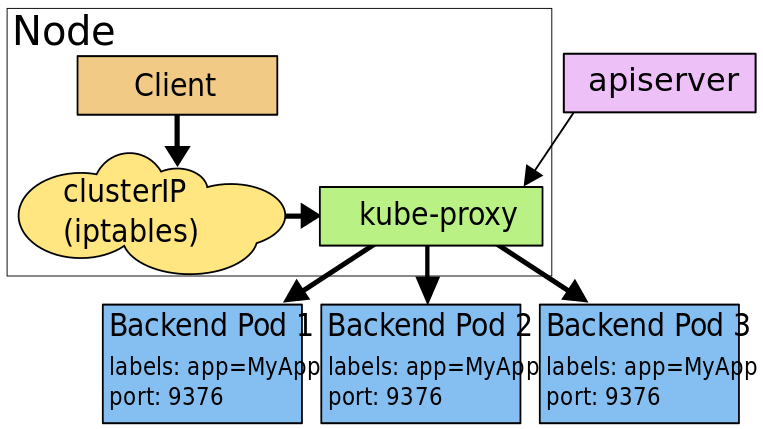
In this mode, kube-proxy watches the Kubernetes master for the addition and
removal of Service and Endpoint objects. For each Service it opens a
port (randomly chosen) on the local node. Any connections to this "proxy port"
is proxied to one of the Service's backend Pods (as reported via
Endpoints). kube-proxy takes the SessionAffinity setting of the Service into
account when deciding which backend Pod to use.
Lastly, the user-space proxy installs iptables rules which capture traffic to
the Service's clusterIP (which is virtual) and port. The rules
redirect that traffic to the proxy port which proxies the backend Pod.
By default, kube-proxy in userspace mode chooses a backend via a round-robin algorithm.
iptables proxy mode
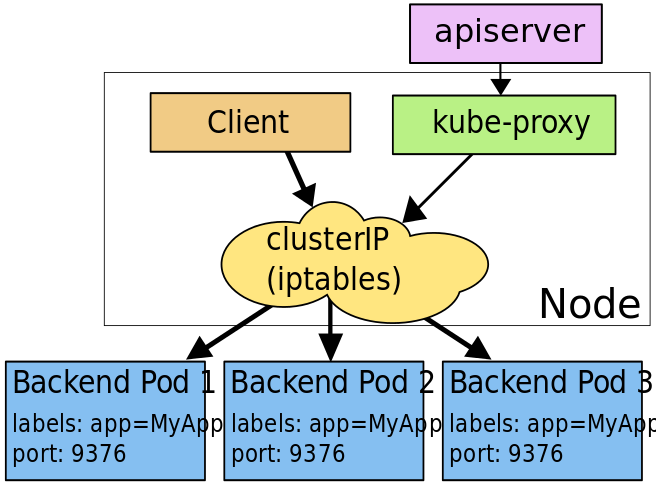
In this mode, kube-proxy watches the Kubernetes control plane for the addition and
removal of Service and Endpoint objects. For each Service, it installs
iptables rules, which capture traffic to the Service's clusterIP and port,
and redirect that traffic to one of the Service's
backend sets. For each Endpoint object, it installs iptables rules which
select a backend Pod.
By default, kube-proxy in iptables mode chooses a backend at random.
Using iptables to handle traffic has a lower system overhead, because traffic is handled by Linux netfilter without the need to switch between userspace and the kernel space. This approach is also likely to be more reliable.
If kube-proxy is running in iptables mode and the first Pod that's selected does not respond, the connection fails. This is different from userspace mode: in that scenario, kube-proxy would detect that the connection to the first Pod had failed and would automatically retry with a different backend Pod.
You can use Pod readiness probes to verify that backend Pods are working OK, so that kube-proxy in iptables mode only sees backends that test out as healthy. Doing this means you avoid having traffic sent via kube-proxy to a Pod that's known to have failed.
IPVS proxy mode
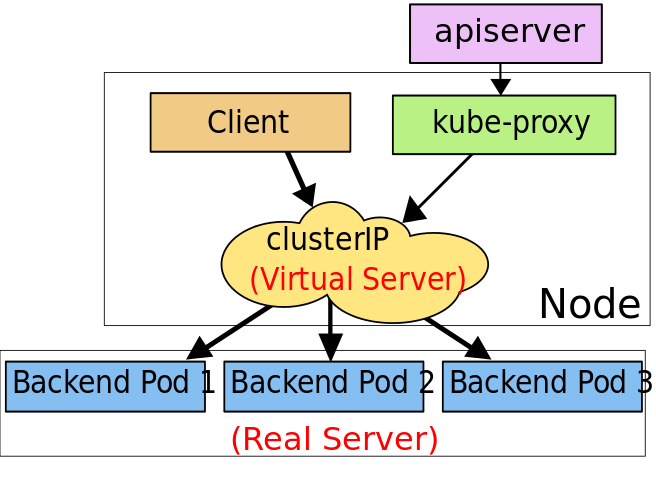
In ipvs mode, kube-proxy watches Kubernetes Services and Endpoints,
calls netlink interface to create IPVS rules accordingly and synchronizes
IPVS rules with Kubernetes Services and Endpoints periodically.
This control loop ensures that IPVS status matches the desired
state.
When accessing a Service, IPVS directs traffic to one of the backend Pods.
The IPVS proxy mode is based on netfilter hook function that is similar to iptables mode, but uses hash table as the underlying data structure and works in the kernel space. That means kube-proxy in IPVS mode redirects traffic with a lower latency than kube-proxy in iptables mode, with much better performance when synchronising proxy rules. Compared to the other proxy modes, IPVS mode also supports a higher throughput of network traffic.
IPVS provides more options for balancing traffic to backend Pods; these are:
rr: round-robinlc: least connection (smallest number of open connections)dh: destination hashingsh: source hashingsed: shortest expected delaynq: never queue
Note To run kube-proxy in IPVS mode, you must make the IPVS Linux available on the node before you starting kube-proxy. When kube-proxy starts in IPVS proxy mode, it verifies whether IPVS kernel modules are available. If the IPVS kernel modules are not detected, then kube-proxy falls back to running in iptables proxy mode.
In these proxy models, the traffic bound for the Service’s IP:Port is proxied to an appropriate backend without the clients knowing anything about Kubernetes or Services or Pods.
If you want to make sure that connections from a particular client
are passed to the same Pod each time, you can select the session affinity based
the on client's IP addresses by setting service.spec.sessionAffinity to "ClientIP"
(the default is "None").
You can also set the maximum session sticky time by setting
service.spec.sessionAffinityConfig.clientIP.timeoutSeconds appropriately.
(the default value is 10800, which works out to be 3 hours).