Controlling the rate of the rollout
The way new pods are created and old ones are deleted is configurable through two additional properties of the rolling update strategy.
They are maxSurge and maxUnavailable and can be set as part of the rollingUpdate sub-property of the Deployment’s strategy attribute, as shown in the following listing.
spec:
  strategy:
    rollingUpdate:
      maxSurge: 1
      maxUnavailable: 0
    type: RollingUpdate
maxSurge
Determines how many pod instances you allow to exist above the desired replica count configured on the Deployment. It defaults to 25%, so there can be at most 25% more pod instances than the desired count. If the desired replica count is set to four, there will never be more than five pod instances running at the same time during an update. When converting a percentage to an absolute number, the number is rounded up. Instead of a percentage, the value can also be an absolute value (for example, one or two additional pods can be allowed).
maxUnavailable
Determines how many pod instances can be unavailable relative to the desired replica count during the update. It also defaults to 25%, so the number of available pod instances must never fall below 75% of the desired replica count. Here, when converting a percentage to an absolute number, the number is rounded down. If the desired replica count is set to four and the percentage is 25%, only one pod can be unavailable. There will always be at least three pod instances available to serve requests during the whole rollout. As with maxSurge, you can also specify an absolute value instead of a percentage.
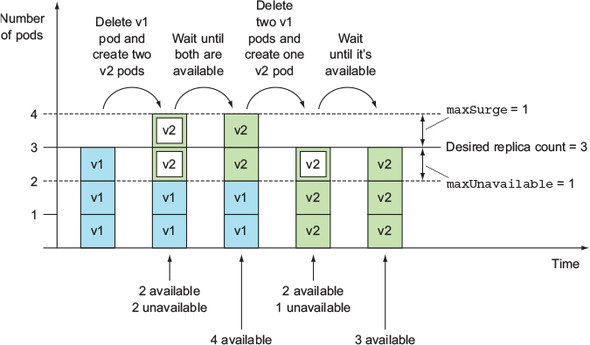
Because the desired replica count in your case was three, and both these properties default to 25%, maxSurge allowed the number of all pods to reach four, and maxUnavailable disallowed having any unavailable pods (in other words, three pods had to be available at all times).
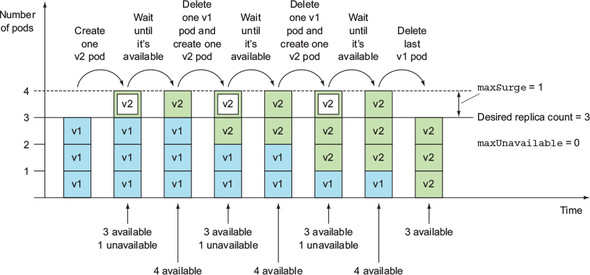
Rolling update of a Deployment with the maxSurge=1 and maxUnavailable=1